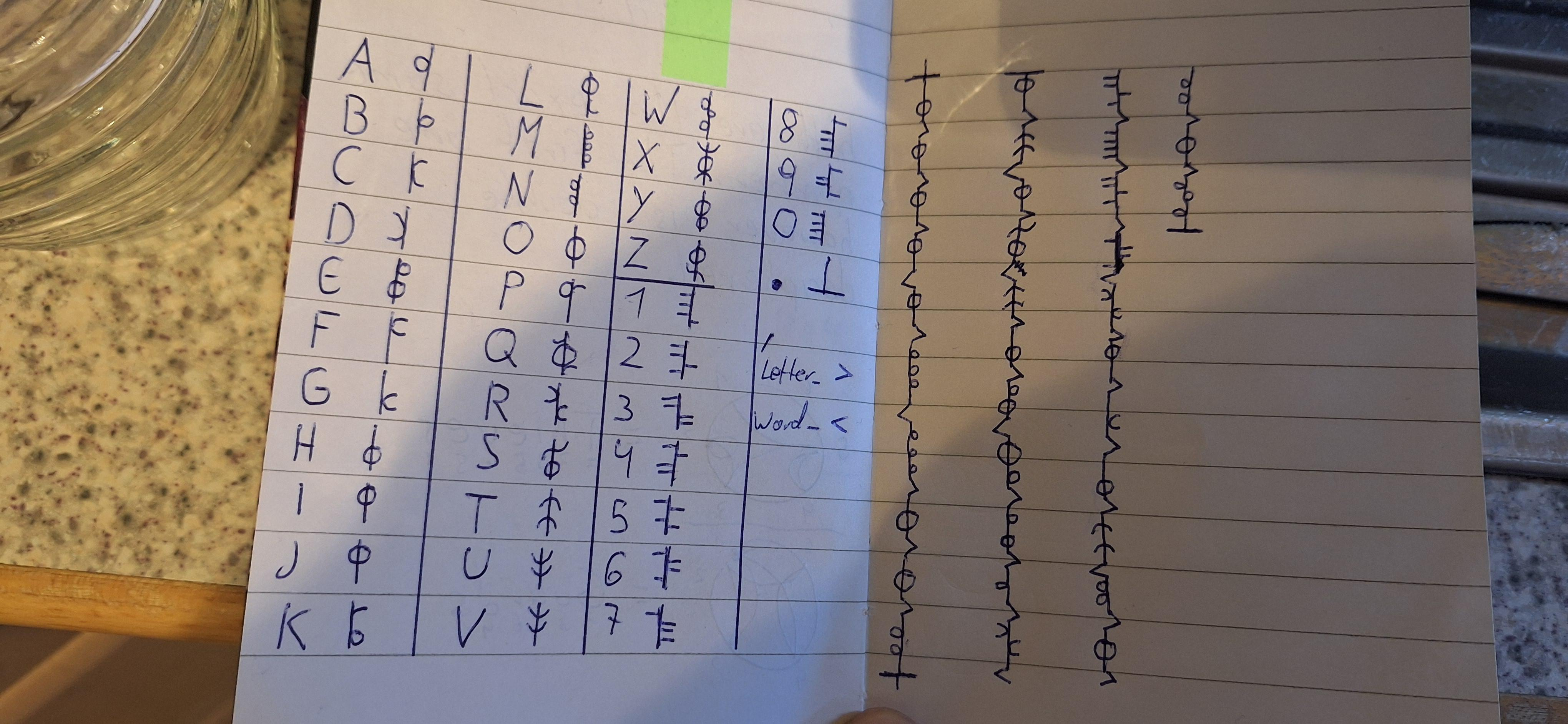
A stem-script cipher made by u/HumanCalledChris and their partner SOLVED
Source: r/ciphers: “Created a cipher with my partner” by u/HumanCalledChris. The poster's hint: “You basically read it from top to bottom and ‘<’ indicates a new word while ‘>’ indicates the next letter!!”
IT IS THE YEAR 2026 RIGHT NO‑ NOW.
“Hiii, I'm Moon. It is the year 2026 right now.”
The key on the left page of the photo is a simple substitution (26 letters, 10 digits and a full stop), so this is a straight reading of the glyphs, not a guess. The only oddity: column 3 ends with N›O›, where the trailing letter break means the word runs on, and column 4 then writes N›O›W in full. The writer evidently began “NOW” at the foot of one column and restarted it at the top of the next.
How the script works
- Every glyph is a set of small marks (circles, c-hooks, arches, cups, ticks) hung on a vertical stem. A whole line of text is one continuous stem, read top to bottom, columns left to right.
- Between glyphs the stem kinks: a kink pointing right (›) = next letter of the same word; a kink pointing left (‹) = new word. These are the key's “Letter >” and “Word <” drawn sideways on a vertical line.
- Digits are 4-bit binary. Each digit is four ticks down the stem; a tick on the left is 0 and a tick on the right is 1, most significant bit on top. 1 = LLLR (0001), 2 = LLRL (0010), … 9 = RLLR (1001), 0 = LLLL. The key never says this, but all ten digits in it follow the rule exactly, and it is how the year 2026 in column 3 reads.
- Bars frame sentences. The key's full stop is a horizontal bar at the foot of the stem (⊥). Column 1 has a cross bar at both ends, column 2 opens with a bar, and column 4 closes with the ⊥ full stop.
- Letters that look alike are told apart by where the mark sits. H is a small circle low on the stem with stem above it, while I is a circle tight against the top of its segment. That is what separates the H and I in “HIII”, “THE” and “RIGHT”.
Visualizer
Hover or tap any glyph on the photo, or any letter on the right, to see it highlighted on both sides with a close-up.
Glyph-by-glyph transcription
Each column of the message cut into its glyphs (contrast slightly raised). › / ‹ mark the letter and word kinks between them.
The key
For each symbol: the key glyph cut from the left page of the photo, my redrawing (used by the encoder below) and a short description. Green outlines mark symbols that occur in the message.
Digits: a 4-bit binary code
Encoder
Type English text to write it in the script. Letters, digits, spaces and full stops are supported; anything else is dropped. Long text wraps into new columns. A word split across columns keeps its › break, just as column 3 does. With the defaults (11 letters per column, new column after a full stop) the sample text reproduces the original's layout, and shows that only the W of “NOW” needed to go in column 4.
Notes and caveats
- H vs I vs J. In the key, I and J are almost the same glyph (a centred circle near the top, J a little larger). The message only needs H and I, and context settles every case: HIII, IT, IS, THE, RIGHT.
- U vs V also look nearly identical in the key, but neither letter occurs in the message.
- Y in “YEAR” has its lower circle drawn off to the right rather than straight under the upper one. The word around it leaves no doubt.
- The final digit 6 of 2026 has heavy, overwritten ink, but its ticks still read L R R L = 0110 = 6.
- “Moon” is presumably a nickname. The literal reading of column 1 is HIII IM MOON (no apostrophe; the key has none).
- Several glyphs echo their Latin letters: a b-bowl for B, a c-hook for C, three bumps for M and two for N (an m and an n turned on their side), a ring for O.
- I could not open the Reddit thread from here (blocked), so this solution rests on the photo alone.
Files: reading_data.py (transcription with pixel ranges), make_crops.py (cuts the glyph images), build_report.py (writes this page). Original photo: images/original.png.